Remote probes and quorum
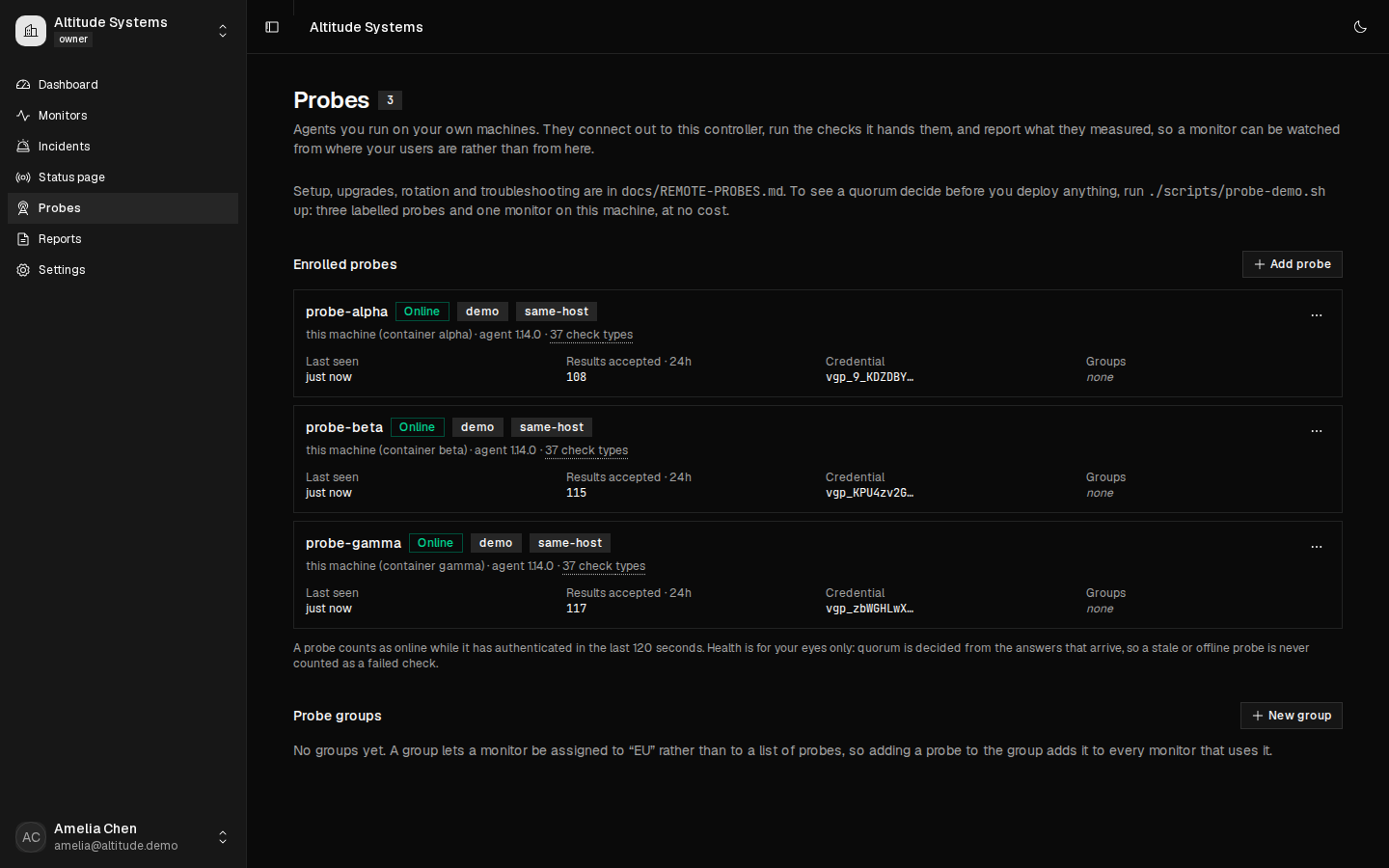
A probe is a small headless Docker container you run on a machine you already own. It connects outbound over HTTPS to your own Vigil controller, asks for work, runs the checks it is given, and reports what it measured. Assign a monitor to two or three of them and require agreement before an incident opens.
Vigil hosts nothing. There is no Vigil region, no relay, no managed probe and nothing to subscribe to. If you have no machine in Asia, Vigil cannot give you a probe in Asia. That is a different product shape from every hosted monitoring service, and it cuts both ways: you get vantage points a vendor will never sell you, and you get none at all until you put one somewhere.
Why bother
A single-vantage monitor cannot tell "the target is down" from "the path between my one server and the target is down". That is the false positive every operator has been paged by, and the reason they eventually stop trusting the alerts.
With three probes and a majority rule, one broken route is reported as degraded, the probe that disagreed is named, and nobody is woken up. All three agreeing is an outage, and it opens exactly one incident.
The rules you choose
| Mode | Meaning |
|---|---|
any |
one probe reporting down is enough |
majority |
more than half of the assigned probes |
all |
every assigned probe |
K-of-N |
exactly the number you type |
Plus a minimum number of probes that must have answered before any conclusion is drawn at all.
A probe that did not answer is never counted as a failure. Not in any mode, at any threshold. If fewer probes answer than the minimum, the round reports "no conclusion" and the monitor goes to unknown, which opens no incident, sends no alert and starts no recovery action. A fleet on a laptop that closed must never look like the internet going down, and that is the single behavior the whole feature is arranged around.
What each outcome looks like
The counts, the threshold and the sentence explaining them are the values stored when the round settled, printed rather than recomputed for display. The reason an operator opens that page at all is "why did this page me, or why did it not", so the arithmetic that produced the verdict sits on the same screen as the verdict.
All four outcomes are in the demo, on their own monitors, with the policy that produced them on the same page. These are real pages from the running product, not drawings of it.
| The round said | Monitor reads | Incident | Open it |
|---|---|---|---|
| 3 of 3 up, threshold 2 of 3 | up | none | Healthy |
| 3 of 3 down, threshold 2 of 3 | down | one, at the transition | Confirmed outage |
| 1 of 3 down, threshold 2 of 3 | degraded | none opens; an open one resolves | Partial regional failure |
| 1 of 3 answered, minimum 2 | unknown | none, and no alert | Insufficient quorum |
The third row is the one worth opening. One vantage point lost its route, the other two answered, and nobody was woken up. The fourth is the one implementations get wrong: the target was healthy the whole time and two agents had stopped, so the round refuses to draw a conclusion rather than reporting an outage.
Two speeds, and they are not comparable
One installation runs checks two ways, and the numbers belong to different planes.
| Where the check runs | Fastest interval | What you get |
|---|---|---|
| On the controller (default) | 500 ms, HTTP, JSON query and TCP | Cadence. One process, no network in the middle. |
| Dispatched to remote probes | 20 s and no faster | Agreement between machines in different places. |
The twenty seconds is a floor, not a default, and the code refuses to save a probe-executed monitor below it. A round has to be opened, leased to each probe, polled for, measured, reported and settled, and under twenty seconds it cannot finish inside its own cadence.
Half-second cadence is a rate. Multi-vantage agreement is a capability. Neither number belongs in the other's sentence, and one install can do both on different monitors.
Installing one
Create the probe in the app, copy the command it gives you, run it. The token in it is single use and expires in an hour; the agent trades it for a long-lived credential and stores that on a volume.
docker run -d --name vigil-probe --restart unless-stopped \
  -v vigil-probe-state:/var/lib/vigil-probe \
  -e VIGIL_CONTROLLER_URL=https://vigil.example.com \
  -e VIGIL_PROBE_ENROLLMENT_TOKEN=vgpe_... \
  your-registry/vigil-probe:1.14.0
Nothing inbound. The agent opens no listening socket, so there is no port to forward and no NAT to traverse. It works from an office LAN, a home connection or a laptop with no network change at all. On the probe's side you allow outbound 443 to your controller, and that is the whole firewall change.
What it costs to store
Probe data is the largest thing Vigil writes, so it is bounded by two retention windows you control: the raw per-probe rows for 14 days and the round with its decision for 90. A round where every probe agreed the target was up is dropped early, because the observation it produced is already recorded where uptime and reports read from.
Measured on one machine, a twenty-monitor installation on a 60 second interval with three probes reaches about 0.95 GB and stops there. The formula, the measurement and the caveats are in the repository you buy, not only in this sentence.
See a quorum decide before you buy anything
Three labeled probes, one monitor and one target, on the machine in front of you, in one command:
./scripts/probe-demo.sh up

./scripts/probe-demo.sh outage      # target down    -> 3 of 3 agree, one incident
./scripts/probe-demo.sh partition   # one route cut  -> degraded, nobody paged
./scripts/probe-demo.sh silence     # two go quiet   -> no conclusion, no incident
./scripts/probe-demo.sh restore     # back to green
Three agents on one machine are not three locations. They share a kernel, a NIC, a resolver and a default route. The demo shows the machinery, and it shows nothing about whether a target is reachable from anywhere else. Every state it produces is recorded, if you would rather read it than run it.
What this is not
- Not hosted locations. Every probe runs on hardware you pay for. There is no Vigil region, relay, VPS or SLA, and no per-region price, because there is nothing to price.
-
Not a verified location. The location field is a
free-text label. Vigil cannot see the machine and does not check it,
so a box in your Frankfurt rack labeled
us-eastwill sayus-eastfor as long as you leave it there. Labels are for your own eyes; the quorum counts probes, not places. - Not independent if it is not independent. Two agents on one host share a kernel, a NIC and a default route. The app warns you where you assign them; it does not stop you, because it cannot tell.
- Not high availability. Probes distribute the measurement. The controller is still one server, holding one database, and if it stops nothing is measured. A monitor's execution can be moved back to local at any time; there is no state in a probe that the controller needs.
- Not faster than 20 seconds. See above. If you need half-second checks, run them on the controller, on their own monitors.
The full operator manual, including reverse-proxy requirements,
rotation, revocation, rollback, capacity and troubleshooting, ships in
the repository as docs/REMOTE-PROBES.md. How this
compares to hosted services is on the
comparison page, where every competitor cell
cites the vendor's own documentation and the date it was read.